 |
|
A number of statistics underscore the problem with medication errors as patients move across the continuum of care in inpatient and outpatient settings. According to the 1999 report "To err is human", 7000 deaths occur annually due to medication errors while medication errors account for one out of every 854 inpatient deaths. A more recent report estimates that 5% of patients experience medication errors and that 60% of these errors occur with transitions in care.
Furthermore, medication errors account for 3.2% to 9.6% of hospital admissions and are the fifth leading cause of death in the United States. In addition, accrediting organizations are addressing these safety concerns in their standards. For example, the Joint Commission has issued its 2008 National Patient Safety Goals and Goal 8 stipulates that providers must accurately and completely reconcile medications across the continuum of care.
Despite the VA's advanced clinical computing systems including an electronic medication record, CPRS does not provide user-friendly mechanisms that will document medication reconciliation while at the same time safely order pre-admission medications from an outpatient list.
Reference: Kramer JS, Hopkins PJ, Rosendale JC, Garrelts JC, Hale LS Implementation of an electronic system for medication reconciliation, Am J Health-Syst Pharm 2007; 64: 404-422
Currently, the Loma Linda VA Healthcare System (LLVAHCS) uses a Component Object Model (COM object) interface to remind clinicians to perform and document medication reconciliation. Specifically, when a patient is admitted to the hospital, the COM object is initiated at patient selection, requesting completion of medication reconciliation before proceeding further into the patient's record. The COM object medication reconciliation tool presents the patient's medications to the clinician on a form. Checkboxes allow the clinician to select which medications will be continued during hospitalization and which will be discontinued. Additional over-the-counter medications or outside prescriptions can be added through the COM object. When the form is completed, a progress note is automatically generated which can be edited and singed. In addition, the COM object generates a database to monitor staff performance on medication reconciliation. From this database, we have demonstrated about 95% compliance with the documentation.
Although this tool satisfies The Joint Commission requirements, it does not allow for true medication reconciliation. Since orders cannot be generated from the current COM object, the documentation often does not correspond to the admission orders. This results because medication reconciliation documentation is separated from the ordering process. Also, clinicians view the process as redundant and merely an exercise in documentation since they must separately order medications at admission.
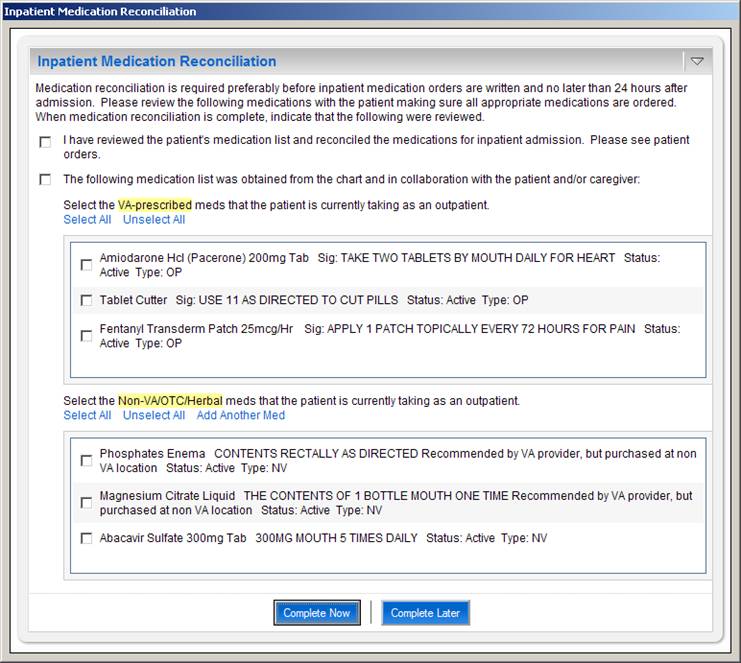
Figure 1: The Inpatient Medication Reconciliation COM Object interface presented to user at patient selection.
The patient's outpatient VA and non-VA med lists are automatically imported and displayed.
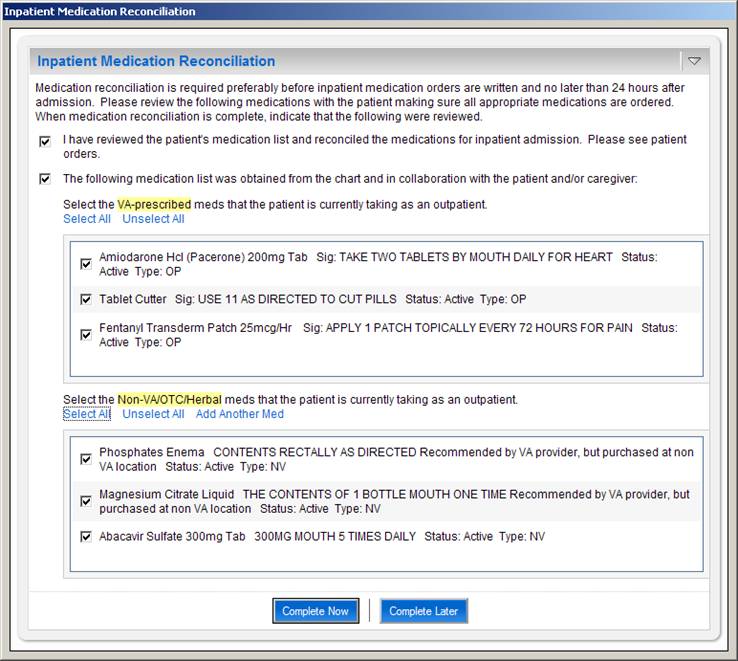
Figure 2: The user completes the dialog by selecting the appropriate checkboxes.
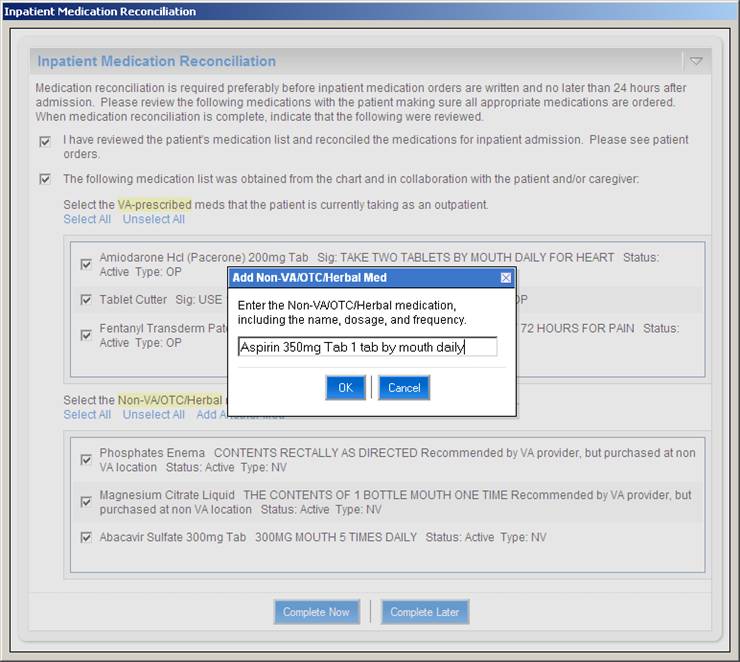
Figure 3: Non-VA/OTC/Herbal medications that are not in VistA may be manually added to the list by the user.
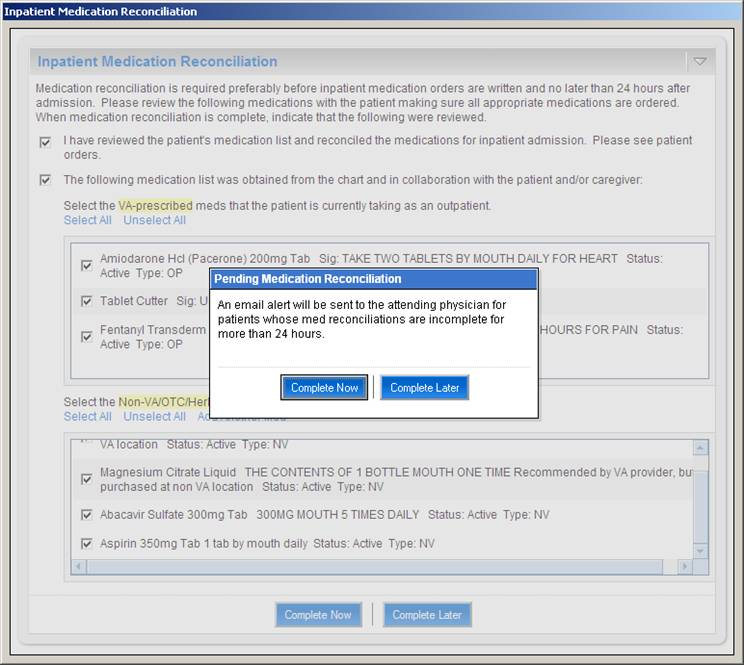
Figure 4: If the user elects not to complete the dialog now, a message is displayed indicating that the attending
physician for this patient will receive an email alert if medication reconciliation has not been completed within
24 hours of admission.
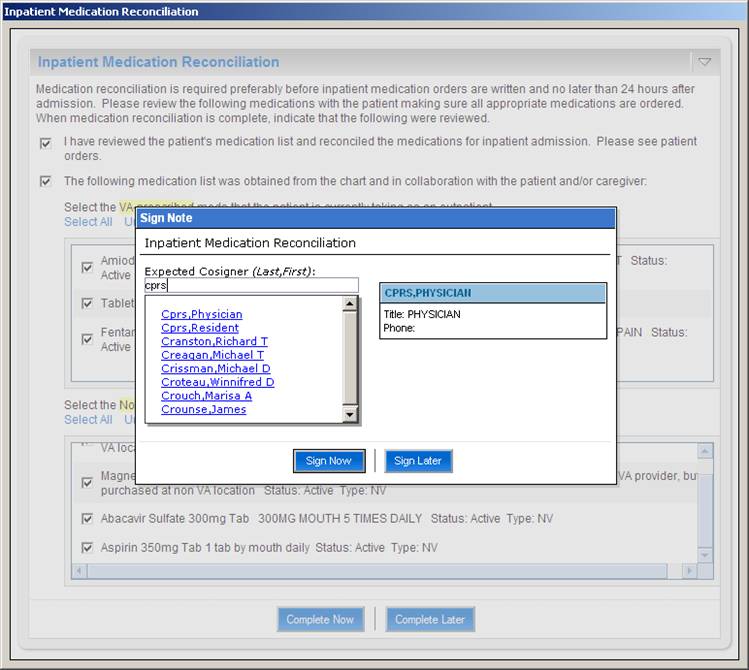
Figure 5: Upon completing the medication reconciliation dialog, the user is prompted to sign the note. The user
may also select the expected cosigner for the note
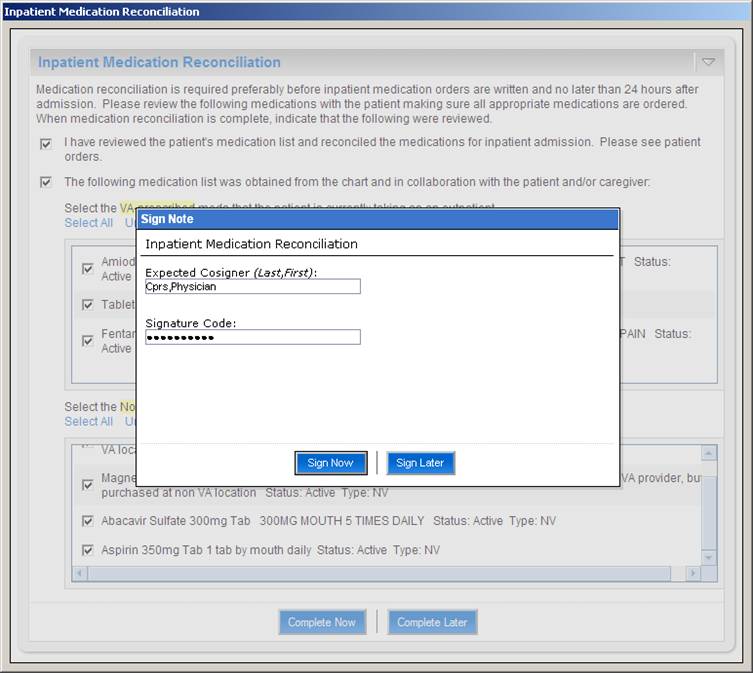
Figure 6: When the note has been electronically signed it is saved and uploaded to TIU where it is displayed in the
Notes tab of CPRS. This completes the documentation component of inpatient medication reconciliation.
Medication Reconciliation TIU Note
When the provider indicates that medication reconciliation is completed, the COM object generates text
for a note based on the information in the COM object dialog box. The user has the option of electronically
signing the note within the COM object dialog itself. The note is created in TIU and immediately appears in the Notes tab of CPRS.
   LOCAL TITLE: MEDICATION RECONCILIATION LLVA
STANDARD TITLE: PHARMACY PROGRESS NOTE
   DICT DATE: DEC 29, 2006@08:47:22  ENTRY DATE: DEC 29, 2006@08:47:22
 DICTATED BY: CPRS,PHYSICIAN       EXP COSIGNER:
     URGENCY:                            STATUS: UNSIGNED

I have reviewed the patient's medication list and reconciled the medications
for inpatient admission.  Please see patient orders.

The following medication list was obtained from the chart and in collaboration
with the patient and/or caregiver:

* Propranolol Hcl 10mg Tab   Sig: TAKE ONE AND ONE-HALF TABLETS
BY MOUTH TWICE A DAY (TAKE WITH FOOD)  ***NOTE DOSE INCREASE***
Status: Active  Type: OP

* Calcium 500mg/Vitamin D 200 Unt Tab   Sig: TAKE 1 TABLET BY
MOUTH THREE TIMES A DAY   Status: Active  Type: OP

* Alendronate Na 70mg Tab   Sig: TAKE ONE TABLET BY MOUTH EVERY
WEEK ** DO NOT LIE DOWN OR EAT FOR 30  MINUTES AFTER TAKING THIS
MEDICATION **   Status: Active  Type: OP

* Sodium Fluoride 1.1% (Fl 0.5%) Dent Gel   Sig: APPLY SMALL
AMOUNT TOPICALLY TWICE A DAY TO TEETH   Status: Active  Type: OP

* Ferrous So4 325mg Tab Ud   Sig: TAKE ONE TABLET BY MOUTH THREE
TIMES A DAY TAKE ANTIBIOTICS FIRST,  THEN WAIT 2 HOURS BEFORE TAKING
IRON SUPPLEMENT   Status: Active  Type: OP

* Ascorbic Acid 500mg Tab   Sig: TAKE ONE TABLET BY MOUTH TWICE
A DAY ALONG WITH FERROUS SULFATE   Status: Active  Type: OP

* Omeprazole 20mg Ec Cap   Sig: TAKE ONE CAPSULE BY MOUTH TWICE
A DAY BEFORE MEALS FOR STOMACH ACID   Status: Active  Type: OP

* Levothyroxine Na (Synthroid) 0.025mg Tab   Sig: TAKE ONE
TABLET BY MOUTH DAILY FOR THYROID   Status: Active  Type: OP

* Lactulose 10gm/15ml Syrup   Sig: TAKE 2 TABLESPOONFULS BY
MOUTH THREE TIMES A DAY *TITRATE TO 3 BOWEL  MOVEMENTS PER DAY*
Status: Active  Type: OP

* Norfloxacin 400mg Tab   Sig: TAKE ONE TABLET BY MOUTH DAILY
FOR PROPHYLAXIS OF INFECTION   Status: Active  Type: OP

* Hydroxyzine Hcl 10mg Tab   Sig: TAKE ONE TABLET BY MOUTH EVERY
6 HOURS AS NEEDED FOR PRURITIS,  INSOMNIA   Status: Active  Type: OP

* Absorbase Top Oint   Sig: APPLY SMALL AMOUNT TOPICALLY AS
DIRECTED FOR DRY SKIN   Status: Active  Type: OP

* Hydrocortisone 1% Lotion   Sig: APPLY LIBERAL AMOUNT TOPICALLY
TWICE A DAY   Status: Active  Type: OP

* Calamine Lotion   Sig: APPLY MODERATE AMOUNT TOPICALLY TWICE A
DAY   Status: Active  Type: OP

* Tramadol Hcl 50mg Tab   Sig: TAKE ONE TABLET BY MOUTH EVERY 12
HOURS AS NEEDED WITH FOOD FOR PAIN   Status: Active  Type: OP

* Quetiapine Fumarate 200mg Tab   Sig: TAKE ONE TABLET BY MOUTH
AT BEDTIME FOR NIGHTMARES.   Status: Active  Type: OP

* Norfloxacin 400mg Tab   Sig: TAKE ONE TABLET BY MOUTH EVERY
DAY TO PREVENT BACTERIAL INFECTION DUE  TO ASCITES AND FREQUENT
PARACENTESIS   Status: Expired  Type: OP
Pending Medication Reconciliation Email Alerts
If the medication reconciliation dialog has not been completed for a new inpatient within 24 hours of admission, an automated email alert is sent to the attending physician for that patient. This serves to remind the attending physician that the documentation portion of medication reconciliation has not been completed for the patient. The attending may then remind his/her team to complete the medication reconciliation process by completing the dialog.
A sample email alert follows:
*** This is an auto-generated message.  Please do not reply. ***

PENDING MEDICATION RECONCILIATIONS

The following patients have pending medication reconciliations > 24 hours:

Patient       Attending                         Specialty
-------       ------------------------------    -------------------------------
Z1234         SMITH,JOHN                        GENERAL INTERNAL MEDICINE
Z9999         SMITH,JOHN                        GENERAL INTERNAL MEDICINE
Z5678         SMITH,JOHN                        GENERAL INTERNAL MEDICINE

In order to complete medication reconciliation for these patients, please have the housestaff caring for the

patients process the pop-up medication reconciliation dialog, or enter a "Medication Reconciliation" progress
note in CPRS.

To view the pending med reconciliations go to

http://r01dvrlnx01.r01.med.va.gov:9080/cprs-com/medrec
Medication Reconciliation Reporting
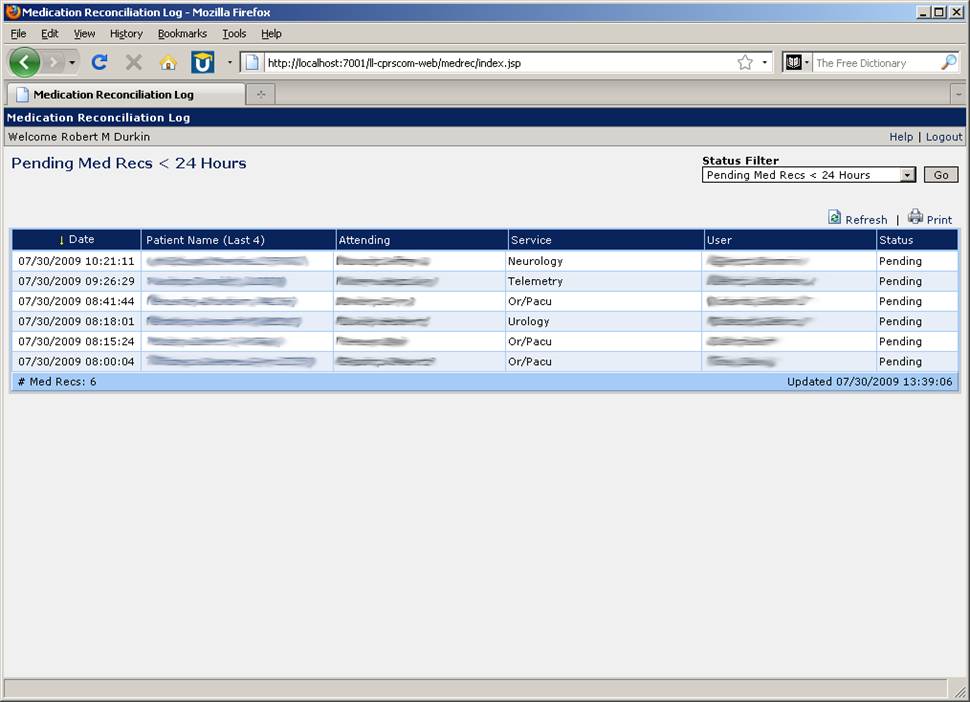
A Web-based reporting tool exists that allows a user to view a log of medication reconciliation activity. The most useful aspect of this log is in viewing lists of pending medication reconciliation records. For example, a patient safety officer may wish to view a list of inpatients for whom medication reconciliation has not yet been completed. The log displays the date and time at which the dialog was first displayed in CPRS, the patient's name and last 4, the attending for the patient, the service, and the user to whom the dialog was last displayed. The Web log is secured by VistA access/verify code login.
The following screenshot shows the medication reconciliation log for inpatients whose medication reconciliations br> have not been completed within 24 hours of admission.
We propose redesigning our current COM object medication reconciliation tool to include a medication ordering function. The COM object will continue to operate in the same manner, invoked at patient selection for inpatients and requiring action (complete now or complete later) before proceeding to other parts of the patient's chart. In the next step, the LLVAHCS COM object would provide a form with a list of pre-admission medications. Since most VA patients receive their medications from the VA pharmacy, this list will be pre-populated with active, expired, on-hold and pending medications from the VistA pharmacy package. In addition, this list will include in a separate section for non-VA, over-the-counter and herbal medications that will be pre-populated with any medications that have been entered in this VistA/CPRS package. Additional entries for non-VA, over-the-encounter, and herbal medications can be entered on the form which will populate that file in VistA/CPRS.
This pre-admission list will be saved in a file in VistA. Once the pre-admission list is populated, the clinician will then review each medication and in a separate column and take action on each medication. Medications that will be continued during the inpatient stay will be moved to another column. When the inpatient list is completed, inpatient orders are ready to be completed. Leveraging the feature in CPRS to transfer outpatient medication orders to inpatient orders, the clinician will select a complete button which will then generate the inpatient medication orders. These orders will be generated for review and signature and will invoke the usual alerts for medication interactions, redundant drug classes, etc. Once the orders are completed, the COM object will generate a progress note as it does now documenting the pre-admission medication list as well as the inpatient orders generated during medication reconciliation.
At discharge, the discharge pharmacist or clinician can invoke the discharge medication reconciliation COM object that will generate the pre-admission medication list as well as the current inpatient medication list. The clinician or pharmacist will take action on each medication and generate a list of discharge medications. The COM object will create a discharge medication note as well as a patient-friendly list of discharge medications for the patient
Reference: Poon EG, Blumenfeld B, Hamann C, et al Design and implementation of an application and associated services to support interdisciplinary medication reconciliation efforts at an integrated healthcare delivery network JAMIA 2006; 13: 581-592
The LLVA Medication Reconciliation user interface displays the pre-admission medication list (PAML) obtained from VistA on the left side of the screen. The patient's VA-prescribed and non-VA/OTC/herbal medications are displayed in two seperate tables. The medication data in the lists are sortable by clicking on the column headers. The outpatient and inpatient medication lists may be printed. Clicking on a medication name expands the row to display the medication sig and a link which allows the user to view medication details in a seperate screen.
The medications may be filtered according to status by clicking the Filter List link and then checking/unchecking the statuses. A detailed view of the VA and non-VA medications can be displayed in a seperate window by clicking on the Detailed View link.
The user may view the patient's allergies/adverse reactions, active problem list, and demographic information by clicking on links in the upper-left of the screen.
The pre-admission medication list (PAML) is obtained from VistA and functionality to allow the user to build the inpatient medication list (IML) from the PAML. Once the IML is created by the user, the inpatient medications are ordered using the standard RPCs that CPRS uses to create medication orders. The text note is also automatically generated by the application and created in TIU reflecting the reconciled medications.
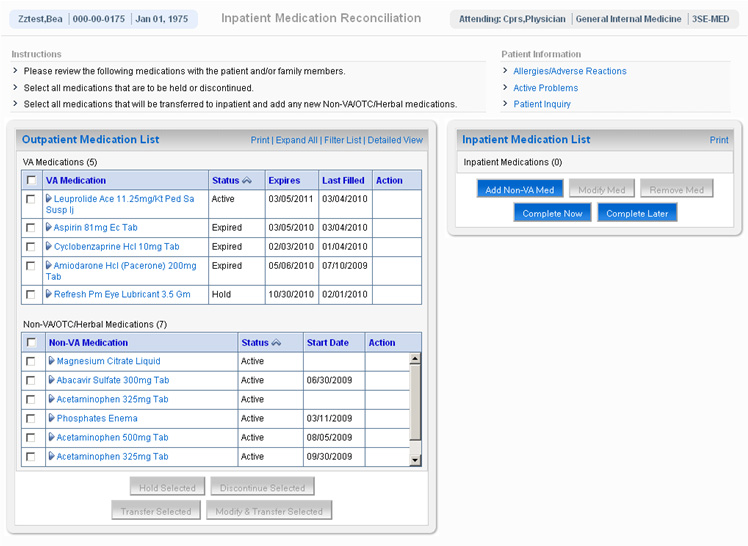
The user performs medication reconciliation by selecting medications and then performing one of four actions on the selected medications:
When one of the above actions is taken on selected medications, the Action field is updated to reflect the action. Medications that are to be continued on an inpatient basis are displayed in the table on the right side of the screen captioned "Inpatient Medication List". Medications in the Inpatient list may be modified or removed by clicking the appropriate buttons. Additional non-VA medications may also be added to the Inpatient list.The user can choose to complete medication reconciliation now or later. If the latter, the user's work is saved and the next time the dialog is displayed it reflects the work earlier performed. When the user clicks Complete Now the tool will check to ensure that action has been taken on every medication and then the medications will be ordered and a TIU note automatically generated reflecting the actions taken for each medication. Finally, the user can elect to electronically sign the orders and note within the tool itself.
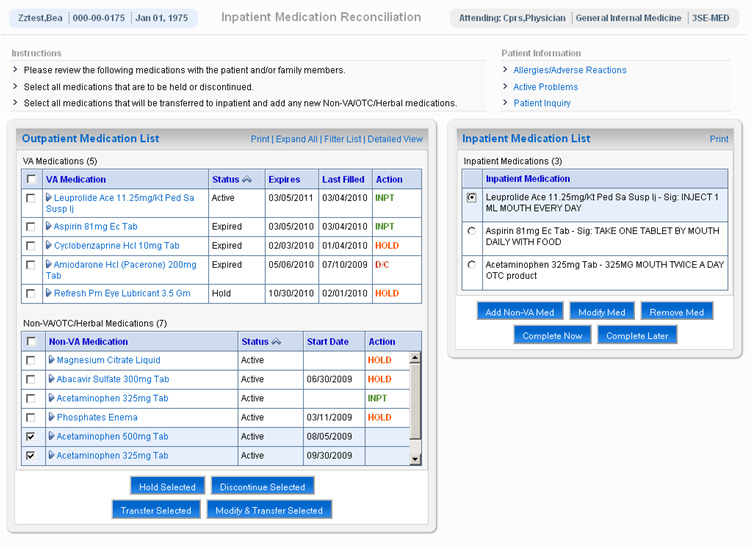
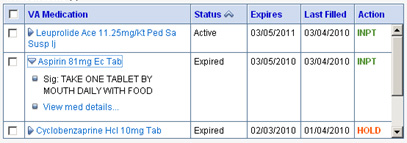
Figure 1: The medication's sig is displayed when row is expanded by clicking on the medication name.
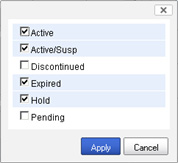
Figure 2: The medication list can be filtered by checking and unchecking items in the status list.
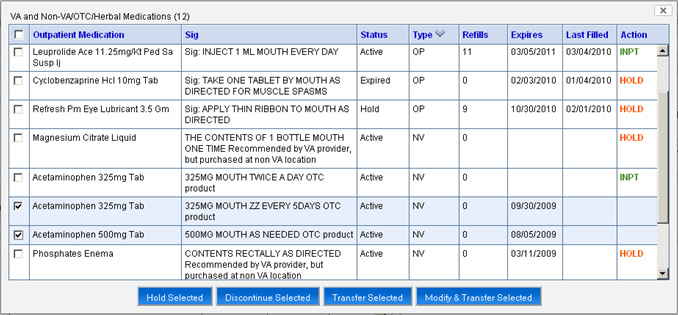
Figure 3: Additional details for the VA and Non-VA medications are displayed in the Detailed View.
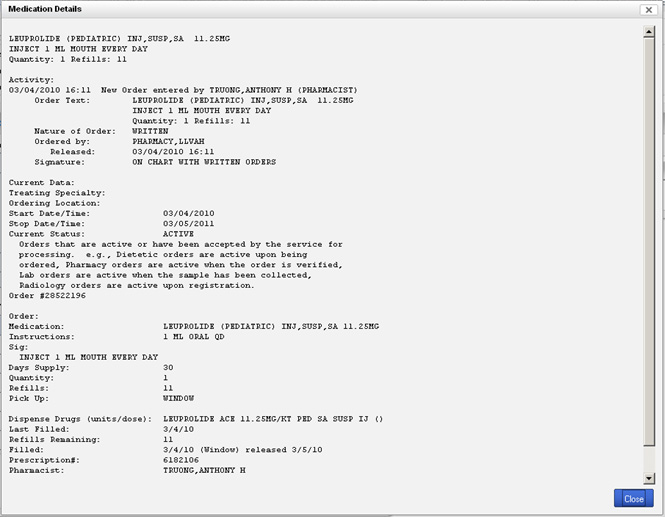
Figure 4: Details of the medication may be viewed.
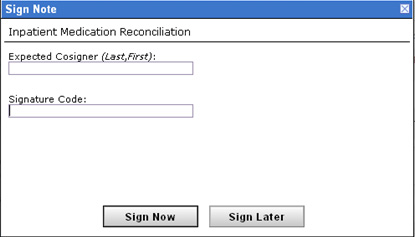
Figure 5: The note and medication orders may be electronically signed within the tool.
First, this innovation has obvious safety advantages as it links the medication reconciliation process to the ordering of inpatient medications rather than have it be a separate documentation exercise. This should reduce the chance for errors of omission or inadvertent changes in dose. Unlike other healthcare organizations, VHA has a major advantage in that most patients receive their medications from VA pharmacies. In addition, non-VA/over-the-counter/herbal medications have a standard naming architecture in VistA/CPRS. Our tool leverages these tools to overcome some of the problems encountered at other institutions developing electronic medication reconciliation tools.
Second, the revised COM object will assist clinicians in performing true medication reconciliation. By developing a pre-admission medication list and acting on each of those medications at the time of admission, clinicians are more likely to actually reconcile each medication. This will reduce redundancy, improve efficiency and help clinicians to see medication reconciliation as a vital element of the patient's care rather than an exercise in chart documentation. Furthermore, costs will most certainly be reduced if medication errors are avoided. Third, our innovation addresses an important unmet need in VHA to provide a tool to reconcile outpatient medications side-by-side with inpatient medications. Such a tool would also assist VA in meeting The Joint Commission safety goals.
Finally, the COM object would be adaptable to various workflow patterns. For example, like our facility, clinicians do admission medication reconciliation while pharmacists perform it at discharge. While pharmacist medication reconciliation has been shown to improve patient safety, errors still occur. Presenting data in a consolidated and accurate manner through the COM object will promote accurate medication reconciliation for all staff.
CPRS has the capability of being extended by means of COM (Component Object Model) modules. These are small programs that enhance and extend the functionality of CPRS. CPRS loads these COM objects into memory and executes them in response to certain user-initiated events, including patient selection, order acceptance, and template creation. The LLVA CPRS COM Object is a general-purpose CPRS extension that provides us with the ability to enhance CPRS now and in the future without needing to deploy additional CPRS COM objects to the workstations throughout the medical center. This is because our COM object simply displays messages in the form of HTML retrieved from a server.
We can extend the functionality of the COM object by writing additional server-side logic that returns content back to the COM object to be displayed to the CPRS user. This is akin to the client-server paradigm of the World Wide Web (WWW) where the COM object in this case performs the role of the Web browser. When updates are made to a Web page, the browser itself does not need to updated, only the content and logic on the server. The same is true for the LLVA CPRS COM Object. The LLVA COM object client that is invoked by CPRS was developed using the Delphi integrated development environment (IDE). The client consists of a single dialog box with an embedded Internet Explorer browser.
When the COM object is invoked by CPRS the client sends a HTTPS request to the server with information about the user, the patient, and other environment variables. The server then responds with the HTML content that is to be displayed by the COM object client to the CPRS user. The server executes the business logic of the application, including calling any remote procedure calls (RPCs) and retrieving VistA data, and generates the user-interface that is to be displayed by the client. The server logic is implemented in Java code and hosted on BEA WebLogic Server. Creating new COM applications or modifying existing applications is all done on the server tier. The COM object client does not need to be updated in order to accommodate new or modified applications.
Because the COM object approach takes advantage of the built-in capabilities of COM in CPRS, this solution integrates well with existing technology and business processes. Our existing COM object framework is a proven platform for enhancing the functionality of CPRS through custom COM object applications. Additionally, since the COM object is launched directly from CPRS, the user does not need to open and log on to a standalone application. The COM object is invoked by CPRS upon patient selection, and so does not depend on the user being proactive in initiating medication reconciliation.
For more on the LLVA COM Object, see http://apps.lom.med.va.gov/~rdurkin/cprscom.
Note: Currently, this demo only works in Mozilla Firefox browsers. It will not display correctly in Internet Explorer.
Please select a test patient below (LLVA VistA login required):